How do you buy lottery tickets online? It's a question plenty of players ask themselves. Some are simply tired of making a trip to the store every time. Some keep forgetting to grab a ticket on the way home. And some just can't find the lottery they actually want to play at their local shop. The first two are easy enough to understand — they'd rather play from the comfort of home. The third group is a little trickier.
And it's true — there's an enormous number of lotteries out there! Some are hardly known at all, while others have made headlines around the world. So naturally the question comes up: "What if I don't want to play my local lottery, and I'd rather try my luck with the European EuroMillions or the American Powerball? The jackpots there are on a completely different scale!" The answer is simple: "Go ahead and play — and play online!"
If you've decided to buy lottery tickets online, you're already in the right place! Below, we'll walk through exactly how to do it, step by step, with screenshots along the way.
Buying a lottery ticket online - choosing your lottery
First, head over to the lottery listings page to decide which lottery you'd like to play.

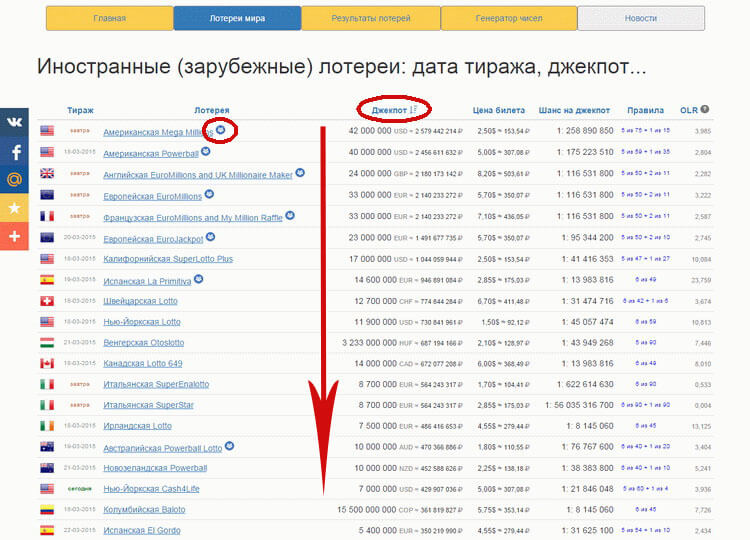
As you can see in the screenshot, lotteries are sorted by jackpot size by default. If the jackpot amount isn't your priority, you can instead sort by region, ticket price, odds of winning the top prize, or by the game's rules. If you're specifically interested in syndicate play, just look for lotteries marked with the  icon — that means the lottery is available as a syndicate game.
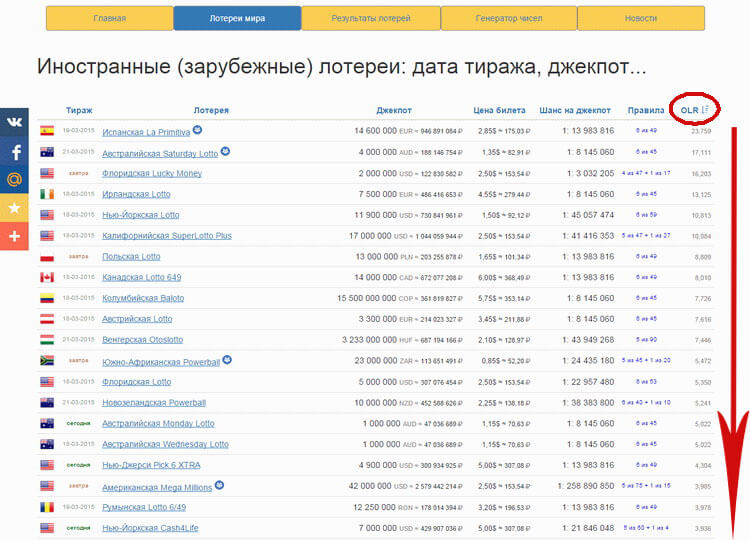
It's worth calling out the OLR (Optimal Lottery Range) column specifically — a score that reflects how efficient a given lottery actually is. It's calculated from the jackpot size, the ticket price, and the odds of winning the jackpot. The higher the score, the better value that lottery offers. As you can see from the table, there are more than 45 lotteries to choose from, and they vary enormously — different jackpot sizes, different odds, different ticket prices! For example, you might find two lotteries with identical jackpot odds of 1: 8,145,060, but one has double the jackpot and half the ticket price of the other. Obviously, that's the better one to play.
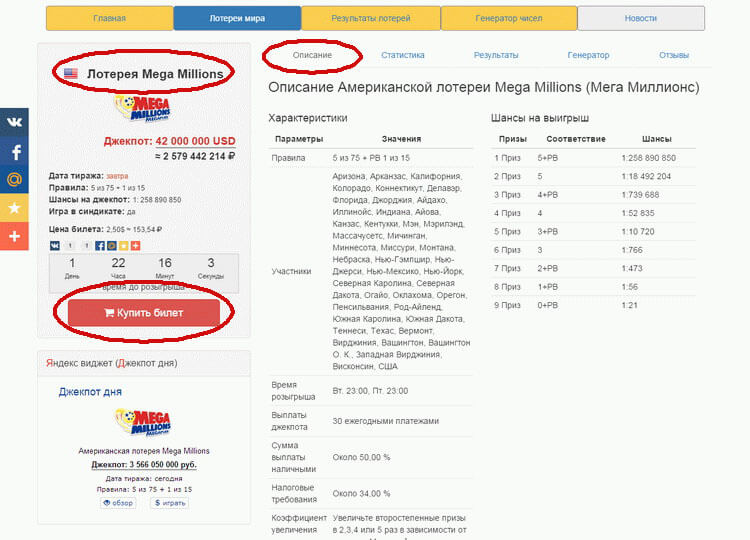
Once you've picked a lottery, head to its dedicated page. In this example, we picked Mega Millions. There, you'll find a detailed rundown: where and when the drawing takes place, the rules, and what combinations count as winning. If you're not one for digging through statistics or past results, and you've already got your numbers picked out, go ahead and click "Buy Ticket."
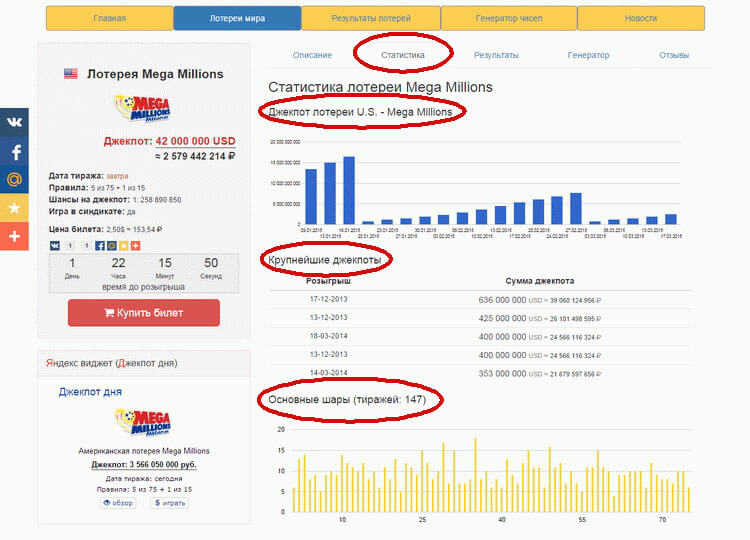
If you'd like to check the numbers and stats for the lottery you've chosen, head over to the "Statistics" tab. There you'll find:
- how the jackpot has changed over time;
- historical jackpot highs;
- stats on how often each main and bonus number has been drawn;
- "cold" numbers that haven't come up in a while;
- the sum of the numbers in each drawing;
- analysis of the lowest and highest numbers drawn.
Head to the "Results" tab, and you'll see a table showing exactly which numbers came up in each drawing. You can also check whether your favorite numbers — or the ones you're thinking of playing — have come up before, and how often.
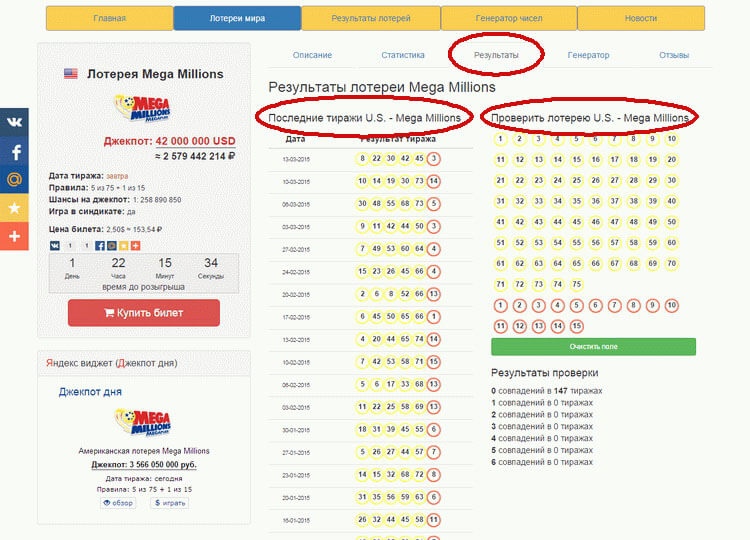
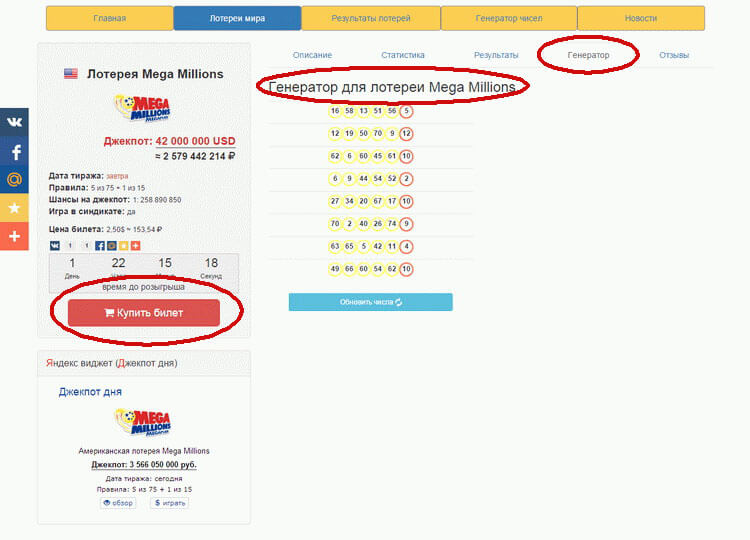
If you haven't settled on a number combination yet, head over to the "Generator" tab. There you can use a random number generator to get a set of numbers to play.
Once you're confident this is the lottery you want to play, click "Buy Ticket."
Buying a lottery ticket online - choosing your numbers
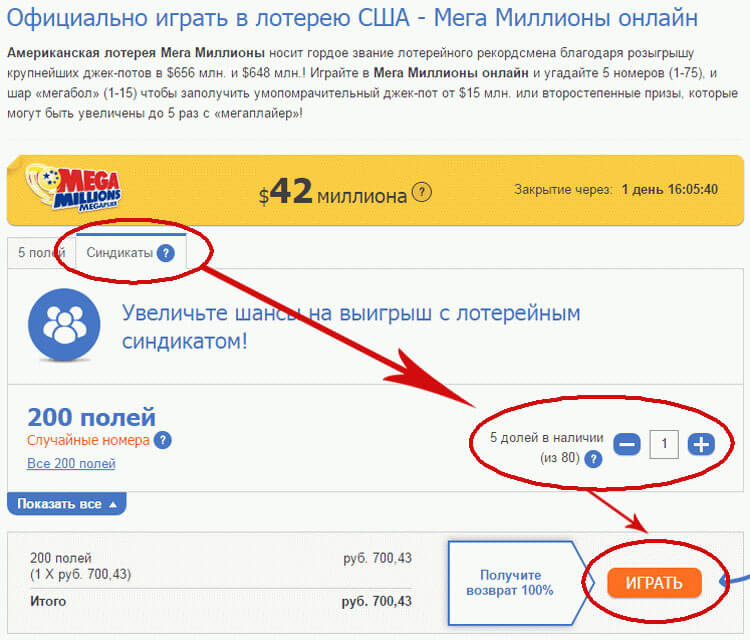
Next, you'll move to the number selection screen for the upcoming drawing.
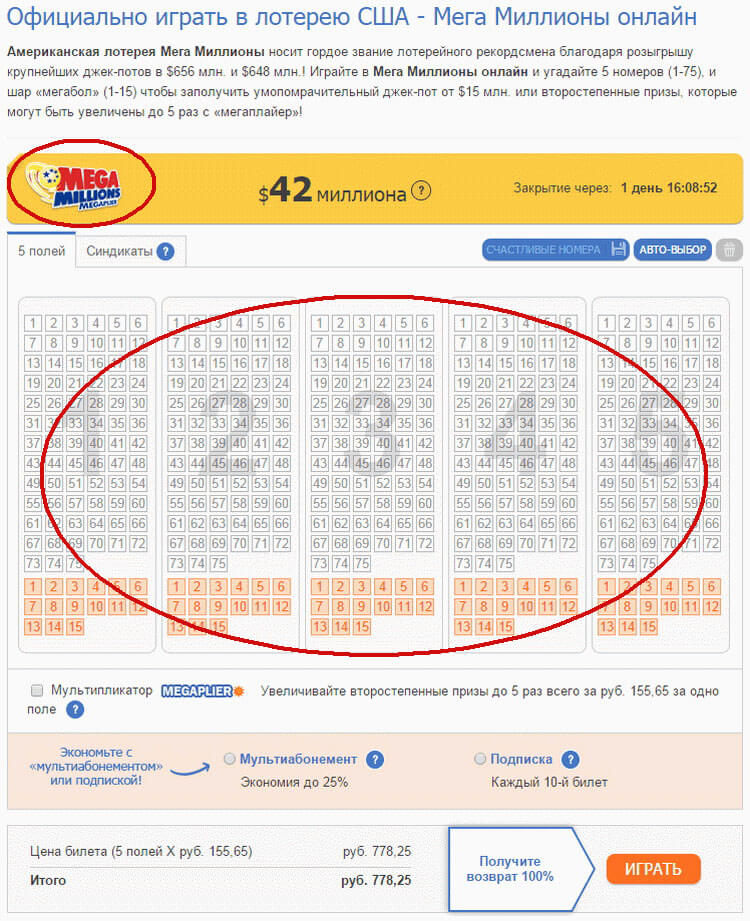
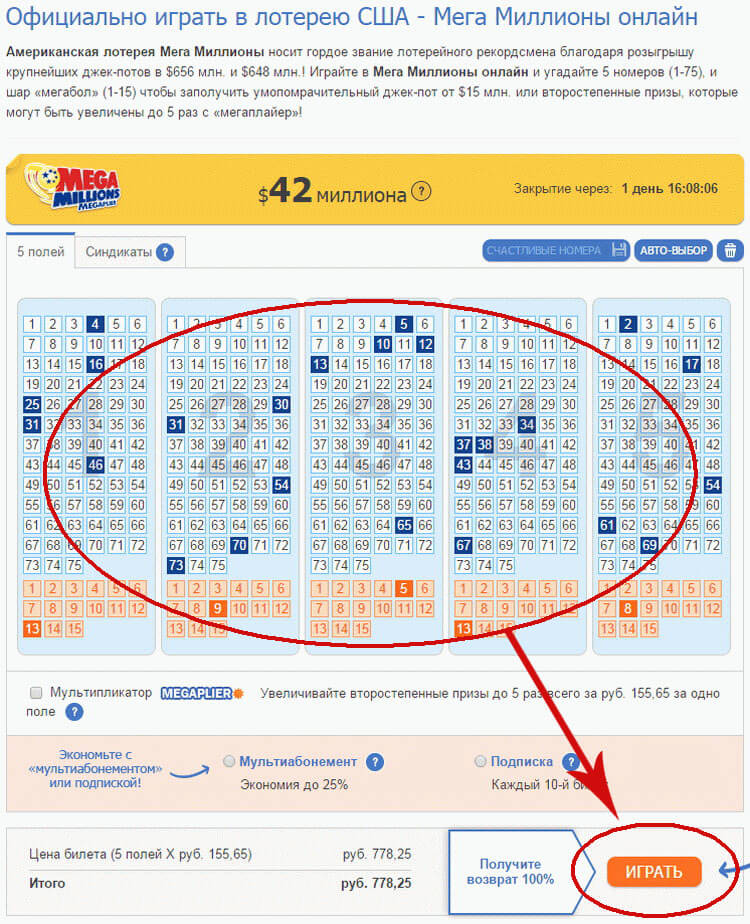
Mark the numbers you want to play, and if you'd like, choose a multi-draw pass or subscription, then click "Play."
If you'd rather play as part of a syndicate, head to the "Syndicates" tab. From there, choose which type of syndicate you'd like (there are currently 4 options), select how many shares you want, and click "Play."
Buying a lottery ticket online - signing in or registering
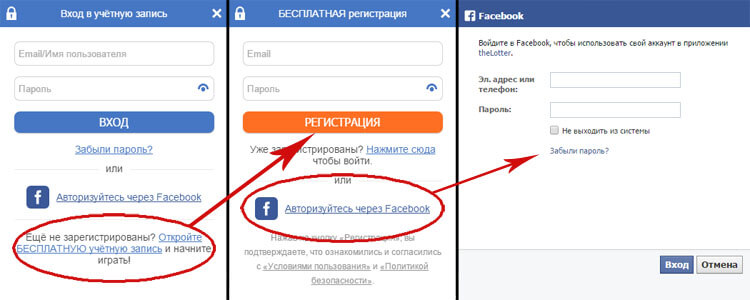
At this stage, you'll need to either sign in or create a new account with the lottery courier. If you've already registered, enter your details in the corresponding fields:
- Email/Username
- Password
First time playing? You'll need to register (and as a nice bonus for new players, there's a promotion that makes your very first game completely free — the full amount you spend gets credited back to your account)! Just click "Open a FREE account." You'll be asked for a valid email address and to set a password, then just follow the prompts. If you have a Facebook account, the process is even faster — simply click "Sign in with Facebook" and enter your Facebook login details. That's the entire registration or sign-in process.
Buying a lottery ticket online - choosing a payment method
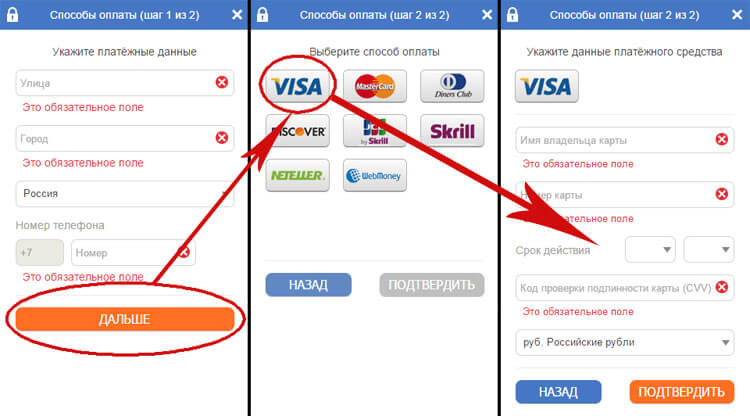
To buy lottery tickets, you'll need to set up a payment method — this is how you'll pay for your games. It's a two-step process. First, you'll enter your country, city, and street address, along with your phone number. All fields are required! Next comes the payment method itself. You can use a bank card — VISA, MasterCard, Diners Club, Discover — or an e-wallet like Skrill, Neteller, or WebMoney. If you're paying by VISA credit card, for example, you'll need to enter the cardholder's name, card number, expiration date, CVV security code, and select your preferred currency.
Once you've completed these steps, your lottery ticket purchase is done. You'll receive a scanned copy of your ticket shortly after. All that's left is to wait for the drawing — and hopefully win big!
And that's it. In this article, we walked through how to buy lottery tickets online, step by step. In future articles, we'll cover how to check your purchased tickets, verify a win, and withdraw your winnings.